
Install it on the clinic computer.
ClinDesk lives on the computer that stays with the clinic. That is where patient chats, charts, drafts, Appointments, and clinic memory are stored.
It answers the clinic's WhatsApp, drafts every reply, fills charts, and keeps Appointments on track. You approve everything.

ClinDesk is on the App Store and Google Play.
Offer the 4:00 pm slot to Rosa. Sent.
Done. Rosa took the 4:00 pm. Her Appointment is confirmed and I noted the reschedule on Sr. Beltrán's thread.
ClinDesk demonstration. You ask ClinDesk to fill the 4 pm slot that Sr. Beltrán just canceled. It checks today's waitlist, finds Rosa Andrade who is free today, and drafts an offer for approval. You approve it, the offer is sent to Rosa on WhatsApp and read, and her Appointment is confirmed.
Ask ClinDesk for the work that usually interrupts the doctor or ties up the assistant. Your assistant prepares the answer, the chart note, or the next step, then waits for approval.
I have to close on Thursday afternoon. Move those patients.
Finds the affected Appointments, offers each patient new times, and drafts every message for your review.
What did Mateo's mom say about his fever last night?
Finds the exact messages and summarizes them with the source chat beside.
Fill the session note from this voice memo.
Transcribes the memo and drafts the note in your own format, ready to review.
Send Sr. Camacho his care instructions for the extraction.
Drafts the aftercare steps and a gentle check-in message for tomorrow.
Ask Canela's owner how the incision looks today.
Drafts the check-in, then files the photo reply to Canela's chart for review.
Photo received · 08:15Who has not confirmed tomorrow?
Lists tomorrow's unconfirmed Appointments and drafts friendly reminders.
ClinDesk starts with the clinic computer, the phone in your pocket, and one real request. It is not a new portal for patients. It is an assistant that works around the conversations your clinic already has.
ClinDesk lives on the computer that stays with the clinic. That is where patient chats, charts, drafts, Appointments, and clinic memory are stored.
The doctor and assistant can pair the ClinDesk app on their phones so important alerts and approval cards can reach the right person, encrypted between devices.
Ask something practical: "Who has not confirmed tomorrow?", "Draft a follow-up for Carmen", or "Fill the chart from this voice note." Your assistant prepares the work and shows you what will happen next.
ClinDesk listens, reads, drafts, checks, and prepares. Then it stops. The proposal shows what it wants to do, why it chose that action, and what the patient or chart will receive. A human approves, edits, or dismisses it.
Patients keep writing where they already write. ClinDesk turns the daily stream into draft replies, urgency chips, patient context, and follow-up work that the clinic team can approve instead of retyping from scratch.
Carmen Suárez
Voice note · 0:12
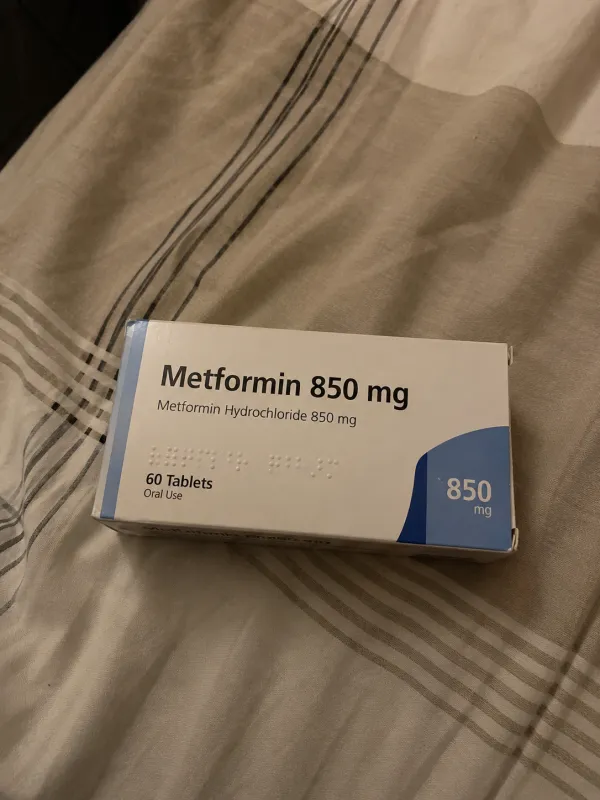
WhatsApp conversation. Patient: Doctor, can I take ibuprofen for the pain?. Patient sent a voice note, 0:12: It's Carmen. The molar they treated still aches at night and I barely slept.. Patient sent a photo: This is what I take every day. Recognized: Metformina 850 mg · added to Carmen's chart. Clinic: Yes Carmen, with your medication ibuprofen is fine. One tablet every 8 hours with food. If it still hurts on Thursday, come in and I will check it..
Patient chart draft for Carmen Suárez. Reason for visit: Molar pain at night after a recent treatment (AI-filled, From chat · 13:58). Medication: Metformina 850 mg, one tablet daily (AI-filled, From photo · 13:59). Allergies: Penicillin. Follow-up: Check in Thursday if pain persists.
Chats, photos, and voice notes are not just messages. They are the story of the visit. ClinDesk reads them, drafts the patient chart, and keeps each detail traceable so the clinician can check the source before accepting it.
ClinDesk can offer times, draft confirmations, and keep follow-ups moving. The "almost" matters: the patient sees a message only after the clinic approves the proposal, and the system Calendar remains the source of truth.
Today · Thursday. 09:00 to 09:30, Carmen Suárez, Follow-up · prescription review, Confirmed. 10:15 to 10:45, Luis Ortega, New patient · consultation, Awaiting reply. 12:00 to 12:30, Sergio Marchetti, Results review, Confirmed.
ClinDesk does not replace the doctor. It does not replace the assistant. It gives both of them more room to do the work only humans should do: decide, reassure, notice nuance, and care.
“I do house calls all day, so my clinic is my phone. I ask the assistant to move a visit or answer a patient, and the work and the message are ready for one approval.”

ClinDesk runs on the clinic computer. Patient records stay in a folder the clinic owns, and the clinic approves every action.
On-device AI handles the daily drafting work. No ClinDesk patient database stores your clinic chats. Your devices sync with encrypted traffic between them.
One clinic subscription includes the desktop app, your personal ClinDesk AI assistant, the ClinDesk app on iPhone and Android for the doctor and assistant, Appointments and follow-up workflows, multilingual replies, and unlimited patient conversations.
14-day money-back guarantee. Cancel anytime.
Answers about ClinDesk, privacy, pricing, WhatsApp, chart drafts, Appointments, and what your clinic needs to run it.
Start with the real work your clinic already has: the next patient question, the next voice note, the next follow-up that should not slip.
Get started